
Collections API - Getting Started
The Collections API (Direct Debit Public API) allows you to manage Payers and their Direct Debit Plans, submit collections and instructions, handle failed collections and monitor alerts.
Base URLs
There are two URLs that can be used. For development, it is recommended that the Test URL is used.
- Test : https://api.paygateservicedemo.com/collections_public/api/
- Production: https://api.paygateservicedemo.com/collections_public/api/
This tutorial will use the test URL.
A complete list of operations can be found in the API document:
https://api.paygateservicedemo.com/collections_public/api/docs/index.html
Tutorials in this series
- Getting started (this page)
- Collections API - Payers
- Collections API - Plans and Schedules
- Collections API - Submissions
- Collections API - Resubmission
- Collections API - Alerts, Messages and Reconciliation
Concepts
- Group - the Direct Debit group (identified by a GUID) that owns Payers, Plans and Submissions. Most calls need a “groupId”.
- Payer - a person or organisation whose bank account is collected from. Each Payer has a “payerReference” that is unique within a Group.
- Plan - the schedule of collections for a Payer (amount, frequency, end condition). A Payer can have many Plans, each with a “planReference” that is unique for that Payer.
- Plan Template - a pre-defined Plan configuration that new Plans can be created from.
Flow
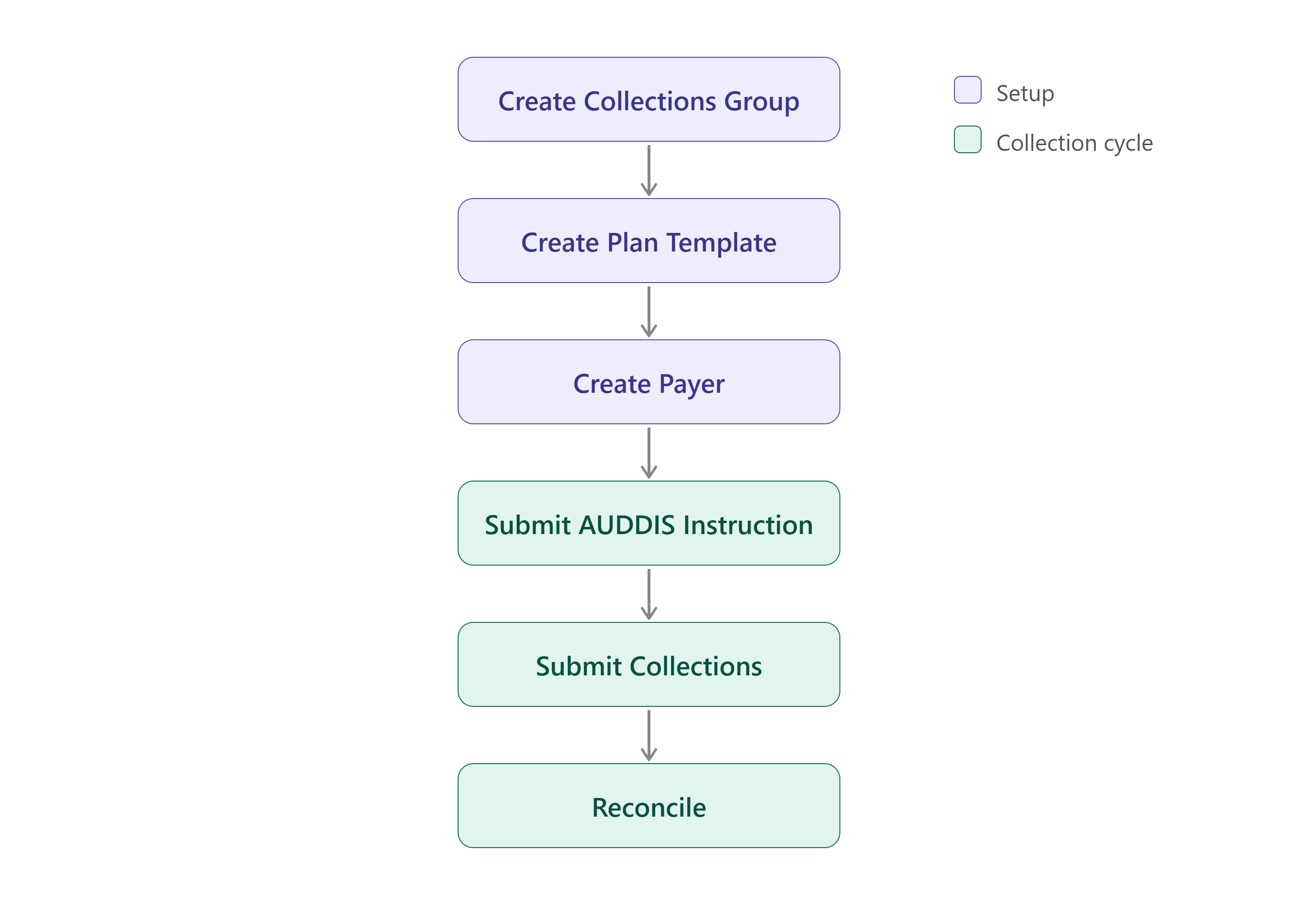
Prior to the creation of Payers, a Collections group needs to be created that specify information related to the Service User (i.e. Service User Name, Service User Number) and Bank Account the collected money goes to. Once a group has been created, Plan Templates are required for the creation of payers.
Once a payer is created, an AUDDIS 0N instruction needs to be sent to BACS before money can be collected from the payer account. Following AUDDIS Instructions being lodged or Collection instructions being sent to BACS, the reconciliation process can be carried out to verify the success of the collections process.
Health check
To confirm that the service is available, call the Ping endpoint.
Call type: GET
URL: https://api.paygateservicedemo.com/collections_public/api/Ping
Example Response:
"Service is running"
Idempotency
Calls that create or change data accept an optional “X-Idempotency-Key” header. Supplying a unique string for each logical request prevents the same request from being processed more than once, for example if a call is retried after a timeout.
X-Idempotency-Key: 5f1c8d3a-2b7e-4c58-9a41-7d0b6e2f9c13
Error responses
Most endpoints return a ProblemDetails response for 400 and 404 errors:
{
  "type": "https://tools.ietf.org/html/rfc7231#section-6.5.4",
  "title": "Not Found",
  "status": 404,
  "detail": "Payer not found.",
  "instance": null
}
The Payer update, status and Plan update endpoints return an “ApiResponseBase” instead:
{
  "success": false,
  "messages": [
    "Sortcode is invalid."
  ]
}
Enumerations
Several fields use integer enumerations.
| PayerStatus | Value | Explanation |
|---|---|---|
| Operational | 0 | Can be collected from and requires no action. |
| Suspended | 1 | Cannot be collected from, could be in this state due to a manual intervention or through the reconciliation process, can be reactivated. |
| Alert | 2 | Can be collected from, but messages have come in from reconciliation or other parts of the process that may require attention. |
| Closed | 3 | Cannot be collected from or reopened. |
| Incomplete | 4 | The Payer has incomplete details, and cannot be collected from. |
| Deleted | 7 | Will not appear in the system. |
| LodgementPending | 8 | An Auddis 0N instruction hasn’t been processed for this payer yet. |
| PayerMessageChannelType | Value |
|---|---|
| 0 | |
| Letter | 1 |
| Titles | Value |
|---|---|
| Mr | 0 |
| Mrs | 1 |
| Miss | 2 |
| Ms | 3 |
| Mx | 4 |
| Dr | 5 |
| Other | 6 |
| RecurrenceType | Value |
|---|---|
| Weekly | 0 |
| Monthly | 1 |
| Yearly | 2 |
| RecurrenceEndType | Value | Explanation |
|---|---|---|
| OneOff | 0 | A one time payment on a specified date. |
| UntilDate | 1 | An ongoing schedule which finishes on a defined end date |
| UntilNumberOfPayments | 2 | A schedule with a limited number of payments. |
| Ongoing | 3 | A schedule that runs indefinitely. |
| AdHoc | 4 | An empty schedule that allows payments to be addded when required, with none generated automatically. |
Query parameters for lists
The pending submission endpoints and the Alerts endpoints share a common set of query parameters:
| Parameter | Description |
|---|---|
| Filter | A list of field names to return |
| Sort | Fields to sort by, e.g. name, name:desc, name:asc |
| ColumnFilters | Column filters to restrict the data returned |
| Download | Set to true to download the results as a csv file |
| PerPage | The number of items to return. Defaults to 10 |
| Page | The page to return |