
Collections API - Submissions
Base URL
This tutorial uses the test URL:
https://api.paygateservicedemo.com/collections_public/api/
Collections for Payers’ Plans, and the Direct Debit Instructions (AUDDIS) that set them up, are held as pending items until they are submitted. A submission is made in two stages: review what is pending, then create the submission.
Flow
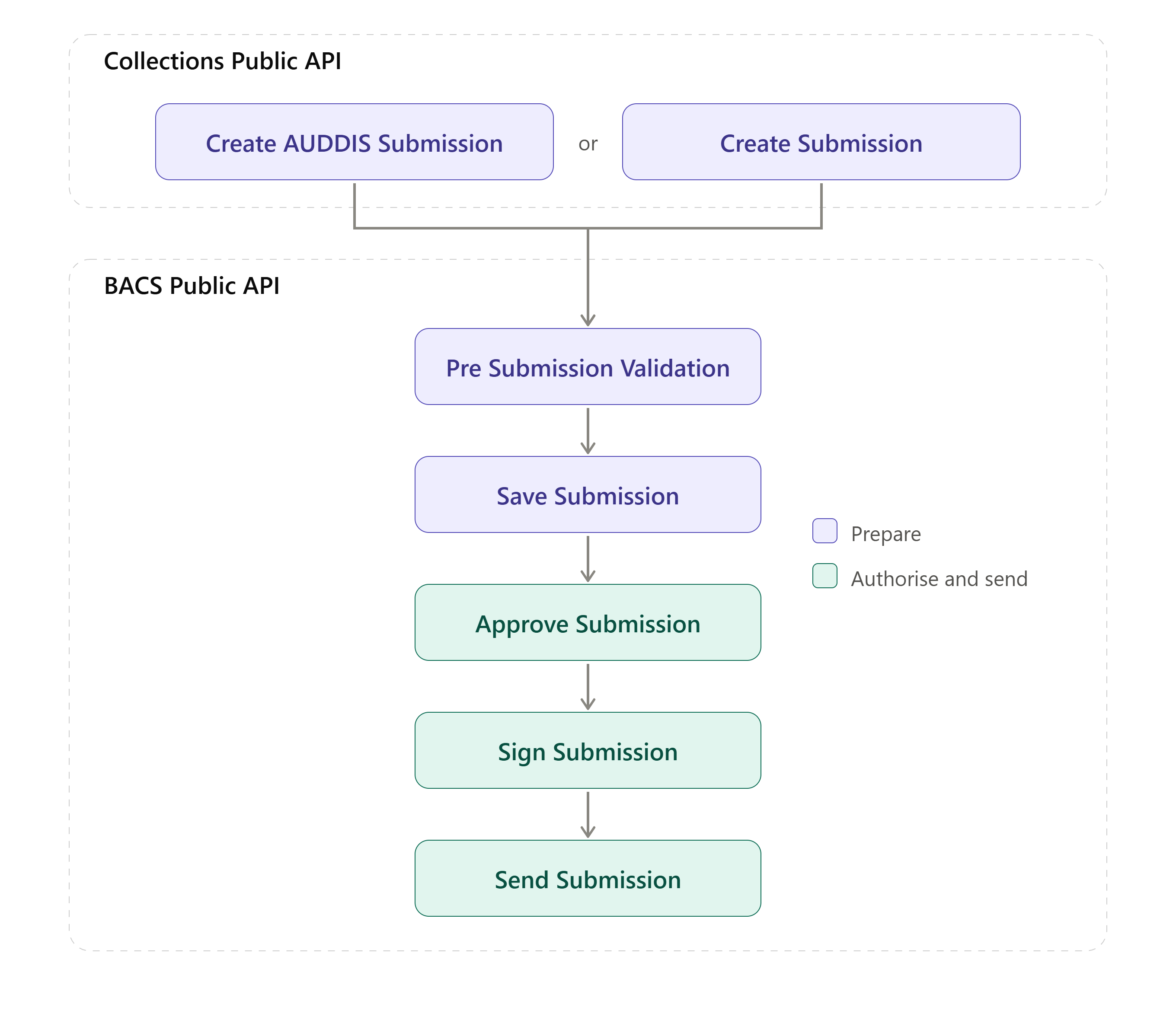
The initial submission, split by submission type (either AUDDIS Submissions for DDI or Collections Submissions for Payments) is generated in the Collections Public API.
Once the initial submission is created, and the user has access to a Submission ID, then the Validation and Persisting actions as well as approval, signing and sending is handled by the BACS Public API. Described from Step 3 onwards in the Payment API - Create Submission documentation
Step 1 - Review pending submission summary
Returns a summary of what is waiting to be submitted across the Groups available to the caller.
Call type: GET
Url: https://api.paygateservicedemo.com/collections_public/api/Submission/summary
The standard list query parameters (Filter, Sort, ColumnFilters, Download, PerPage, Page) described in Getting Started can be used, for example:
/api/Submission/summary?PerPage=25&Page=1&Download=false
Step 2 - Review pending payments
Call type: GET
Url: https://api.paygateservicedemo.com/collections_public/api/Submission/{groupId}/payments
Response:
[
  {
    "ukDdmsPendingPaymentId": "0b6b2f0e-7c1b-4d6a-9f40-1d7f8a3e5c21",
    "paymentPlanId": "6a1d3e0c-5f9b-4b7e-8c21-3e4a9d7b1f02",
    "ukPayerId": "c4e8a1d2-9b3f-4e6a-a7d5-2f1b8c0e9a34",
    "groupId": "3d8ac4aa-4610-48a7-8d74-a5a3e192a42c",
    "groupName": "My Collections Group",
    "planReference": "PLAN0001",
    "processingDate": "2026-11-30T00:00:00Z",
    "txCode": "01",
    "amount": 10.00,
    "payerName": "Mr John Smith",
    "firstName": "John",
    "surname": "Smith",
    "payerReference": "SMITH0001",
    "collectionDate": "2026-12-01T00:00:00Z",
    "paymentComposite": "SMITH0001-PLAN0001"
  }
]
Step 3 - Create the payments submission
Call type: POST
Url: https://api.paygateservicedemo.com/collections_public/api/Submission/payments
Optional header: X-Idempotency-Key
Request:
{
  "groupId": "3d8ac4aa-4610-48a7-8d74-a5a3e192a42c",
  "submissionReference": "DECCOLLECTIONS",
  "contraNarrative": "MY COMPANY"
}
A successful call returns HTTP 200. The submission can then be progressed using the BACS API.
Step 4 - Review pending AUDDIS instructions
AUDDIS instructions set up, amend or cancel Direct Debit Instructions with the Payer’s bank. They are listed in the same format as payments.
Call type: GET
Url: https://api.paygateservicedemo.com/collections_public/api/Submission/{groupId}/auddis
The response is an array of the same “PaymentSummary” objects shown in Step 2.
Step 5 - Create the AUDDIS submission
Call type: POST
Url: https://api.paygateservicedemo.com/collections_public/api/Submission/auddis
Optional header: X-Idempotency-Key
Request:
{
  "groupId": "3d8ac4aa-4610-48a7-8d74-a5a3e192a42c",
  "submissionReference": "DECAUDDIS"
}
A successful call returns HTTP 200. A 400 returns a ProblemDetails body describing the problem.
Order of submission
New Payers’ instructions must be advised through AUDDIS before their first collection is submitted, so submit the AUDDIS instructions before the payments that depend on them.